GUIDE · SERVER SAFETY
Discord Anti-Wizz and Anti-Nuke: How to Protect Roles, Channels and Staff Access
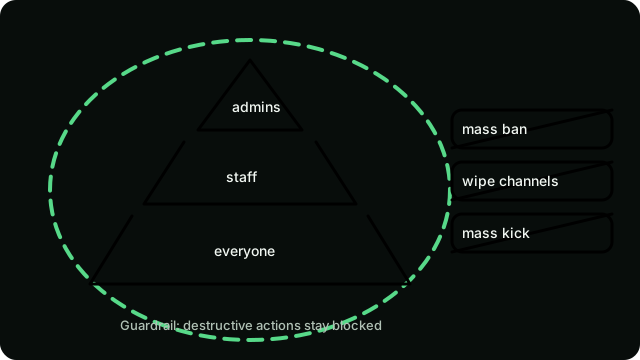
Anti-wizz is another name for anti-nuke: protection against mass destruction of a server (deleted channels, banned members, stripped roles) usually caused by a compromised admin account or a malicious bot. ARK Bot watches for bursts of destructive actions — mass bans, kicks, channel deletions, role wipes, and rapid channel creation (wizz-style spam) — throttles the source past configured thresholds, and alerts staff with audit-log context for review. Trusted roles and bots can be exempted so normal admin work is never interrupted. If an incident still breaks through, the recovery checklist below keeps damage contained.
By ArkFlame · Published 2026-10-13 · 3 min read
What wizzing means
“Wizzing” (also spelled wiz) is slang for wiping a Discord server: deleting or renaming channels, banning members in bulk, deleting roles, or revoking staff access. It almost always uses legitimate permissions — someone with Administrator, Manage Channels, Manage Roles, or Ban Members runs destructive actions at speed, either deliberately or through a compromised token.
Anti-wizz vs anti-raid vs anti-spam
Anti-wizz/anti-nuke watches privileged accounts and bots for destructive actions. Anti-raid watches joins and message floods from many accounts (see our raid protection guide). Anti-spam watches message content such as links. A server can survive spam and still be destroyed in minutes by one rogue admin, so treat privileged-access hygiene as the higher priority.
What can happen in a server nuke
Typical damage includes mass channel deletion, mass bans, role deletion that removes every staff permission at once, webhook creation for follow-up spam, and server setting changes that lock real owners out. Recovery is slow because each ban, channel, and role must be restored individually — prevention is far cheaper than repair.
Harden Administrator, Manage Roles, and Manage Channels
Grant Administrator to as few people as possible — ideally only the owner and one backup. Give moderators Ban Members, Kick Members, Timeout Members, and Manage Messages instead of Administrator or Manage Roles. Keep the bot roles you trust above moderator roles but below owner-controlled admin roles, and review the permission list at Discord's permission documentation whenever you change the hierarchy.
Review integrations, remove unknown bots
Open Server Settings → Integrations and Audit Log. Remove bots you do not recognize, revoke webhooks you did not create, and rotate the server widget or template if either was shared publicly. Any bot with Administrator can destroy the server exactly as fast as a rogue admin, so every integration is part of your attack surface.
How thresholds, trusted roles, and staff alerts work
ARK Bot's anti-nuke protection combines three mechanisms. Rate thresholds flag or pause an account or bot performing many destructive actions per minute — mass bans, kicks, channel deletions, role wipes, and rapid channel creation, which is treated as a wizz signal. A trusted list exempts the owner's accounts and vetted bots, so planned maintenance and legitimate tooling never trigger a response. Every trigger sends a real-time alert to a private staff channel with audit-log context, so reviewers see who acted, what was hit, and how fast — then confirm or reverse course. Tune thresholds and the trusted list in /settings, and re-check them after every staff change.
Incident response when a nuke starts
- Remove the rogue account's roles or ban it from an unaffected admin account.
- Revoke its bot tokens and webhooks under Integrations.
- Restore channels and roles from a template, backup, or the clone of a sister server.
- Unban affected members in batches and re-announce what happened.
- Enable two-factor authentication requirements for moderation actions.
What ARK Bot covers — and its limits
ARK Bot provides moderation tools — /warn, /warnings, /timeout, /ban, /clear, anti-link rules, and a honeypot channel — plus anti-nuke burst protection that throttles destructive-action spikes and alerts staff. Three limits remain yours to manage: Discord's role hierarchy still applies, so keep the bot role above the roles it must act against; no tool restores deleted channels or roles for you, so keep a recent server template or backup; and always cross-check alerts against Server Settings → Audit Log, because audit entries are the final record of who did what.
Anti-nuke checklist
- Fewer than three accounts hold Administrator.
- Two-factor authentication required for moderation actions.
- No unknown bots or webhooks in Integrations.
- Staff-report path exists for reporting a rogue moderator.
- A recent server template or channel backup exists.
Conclusion
Anti-nuke safety is mostly permission hygiene: fewer admins, reviewed integrations, and a recovery plan. Use the checklist above quarterly, not just after an incident.
Related: Anti-nuke feature · Moderation feature · Raid protection guide · Setup guide